The Best GCam Port
for Compatible Android Devices
LMC 8.4 brings Google Camera's powerful computational photography to any Android phone — HDR+, Night Sight, Portrait Mode, Astrophotography & more. Completely free.
What is LMC 8.4 APK?
A powerful Google Camera mod designed for compatible Android devices
LMC 8.4 is a third-party camera application created by the popular developer Hasli. Based on Google Camera (GCam), it brings advanced computational photography to almost any Android device — even mid-range and budget phones that don't officially support Google Camera.
Although expensive smartphones have good cameras, their stock camera apps don't always deliver the best results. LMC 8.4 uses Google's powerful image processing algorithms to automatically handle everything — so you don't need to manually edit your photos later. It supports XML config files that let you fine-tune the camera for your specific device hardware, resulting in sharper images, better colors, and more realistic skin tones.
Whether you love portrait shots, night photography, scenic landscapes, or capturing action in slow motion — LMC 8.4 delivers professional-level results on many compatible Android phones, for free.
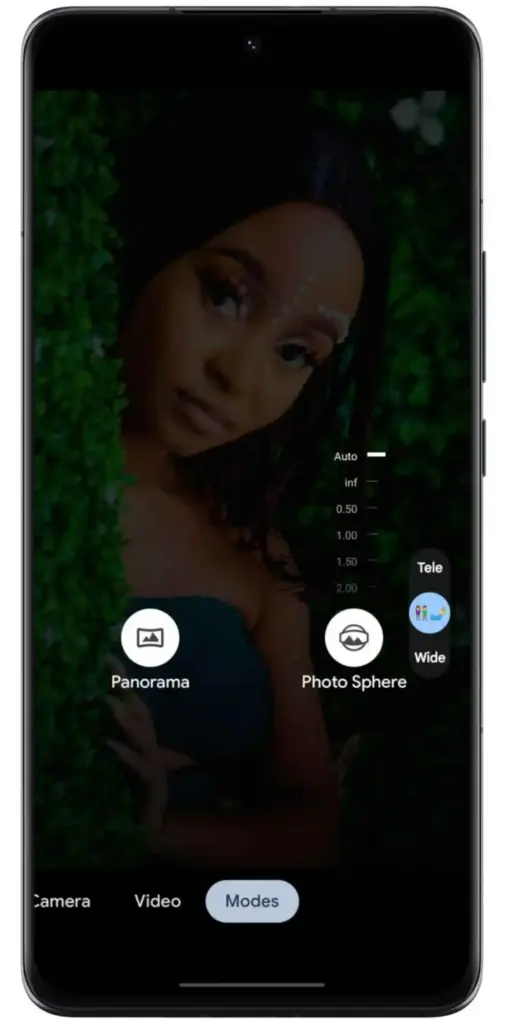
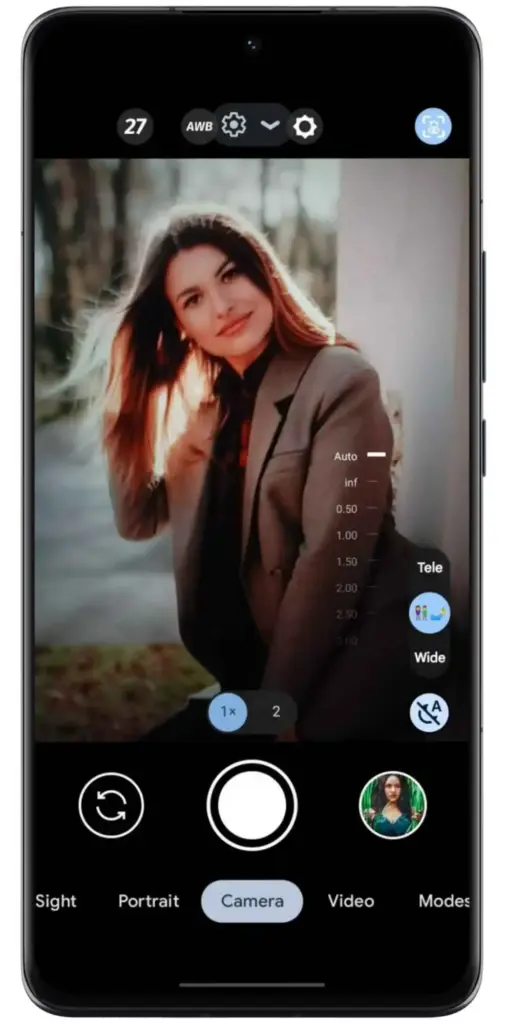
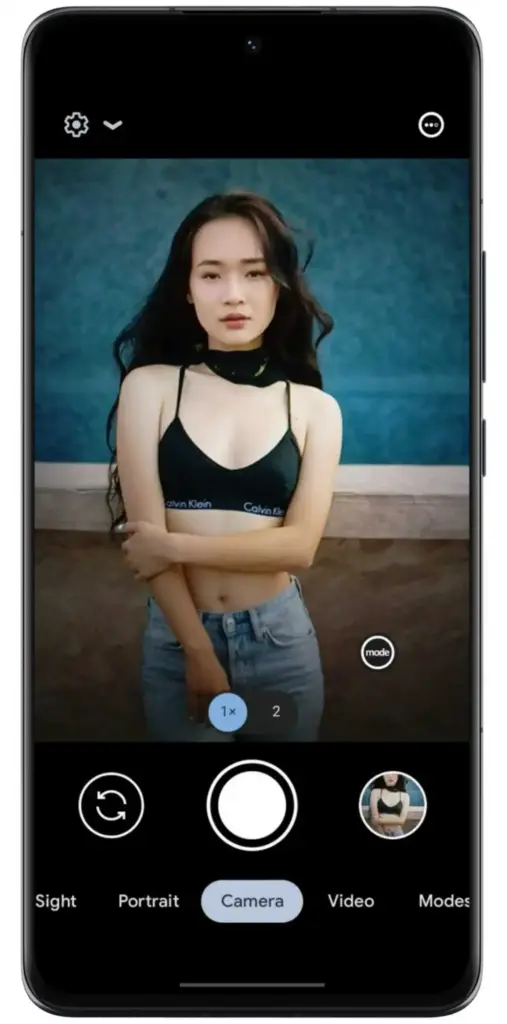
See LMC 8.4 in Action
Explore the camera interface across different shooting modes and scenarios
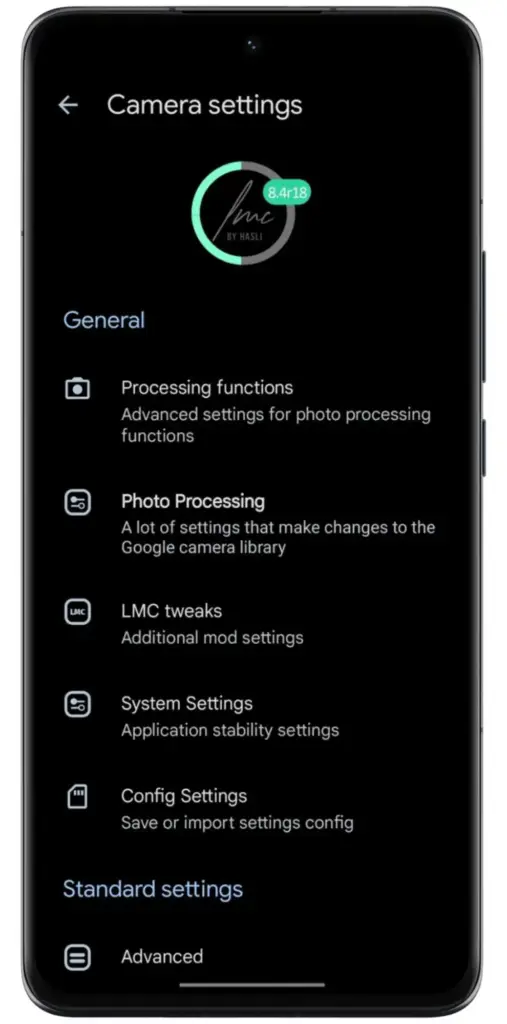
Everything You Need to Shoot Better
Professional-grade camera tools available on any Android device, completely free
HDR+ Enhanced
Blends multiple exposures for better lighting, color, and detail — especially powerful in mixed or high-contrast lighting situations.
Night Sight
Take bright, sharp photos in very low light without a flash. Captures more detail in darkness than any stock Android camera app.
Portrait Mode
Focus on the subject and blur the background for professional-looking bokeh-style photos with just a single tap.
Astrophotography
Long exposure mode for breathtaking starry skies, galaxies, and night landscapes — without any motion blur.
Panorama Mode
Slowly sweep your camera to capture wide landscapes, cityscapes, or large group shots stitched into one seamless image.
Video Stabilization
Smooths shaky footage whether you're walking or panning, producing steady and professional-looking video without extra gear.
Slow Motion
Records at a higher frame rate so every detail of fast-moving action plays back in stunning, frame-by-frame slow motion.
AI Auto-Focus Tracking
Locks onto your subject and keeps them sharp even as they move through the frame, powered by real-time AI scene analysis.
Ultra-Res Zoom
AI enhances detail as you zoom so you get crisp, sharp results at magnification levels that normally produce blurry images.
Custom Filters & Presets
Apply artistic styles instantly — vivid, cinematic, vintage, and more — all directly within the camera app without editing tools.
Underwater Mode
Capture clear and colorful photos beneath water surfaces with adjusted lighting, reduced noise, and improved aquatic clarity.
Dirty Lens Reminder
Detects lens smudges before you shoot and reminds you to clean them, ensuring every photo comes out bright and crystal clear.
Download LMC 8.4 APK
Choose the version that best matches your device. R18 is recommended for most modern phones.
Visit the Website
Go to lmc84apkfile.com where all six versions are listed. Pick the version that matches your device specs.
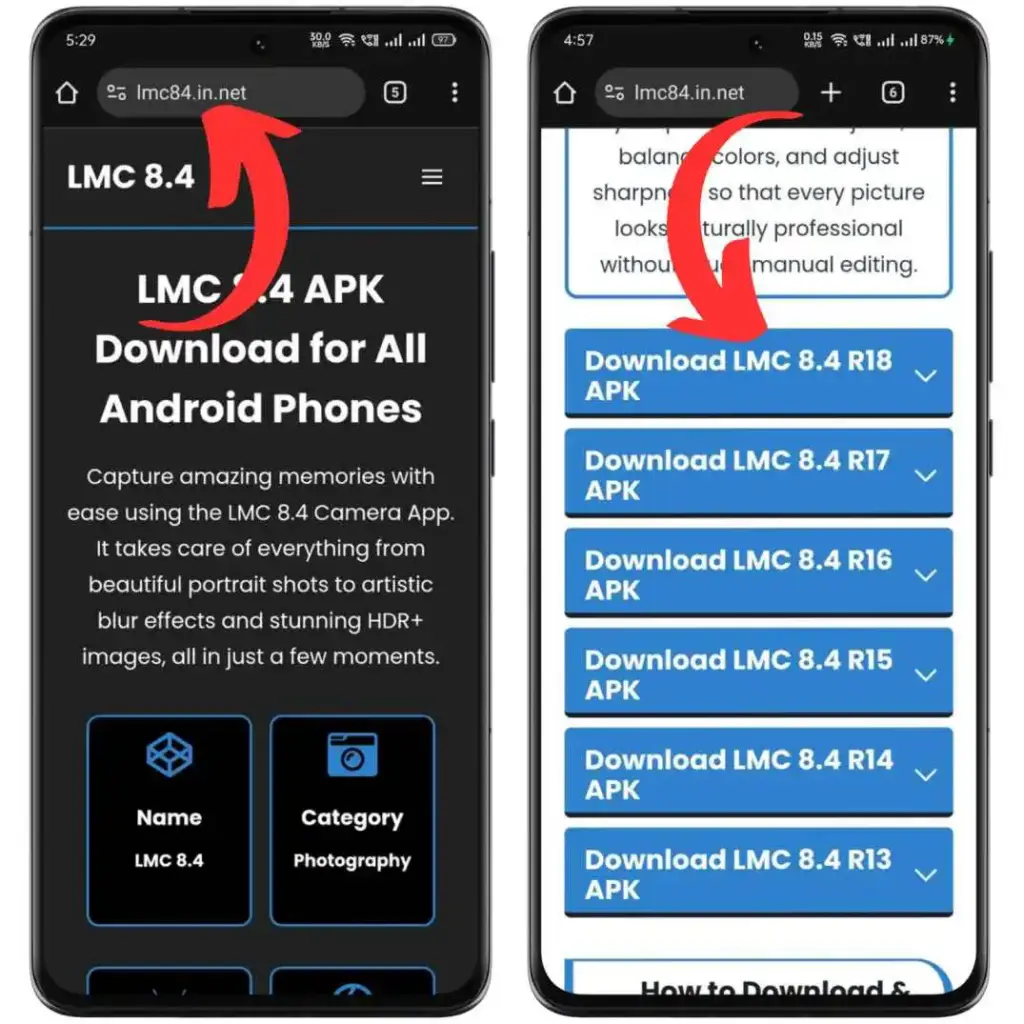
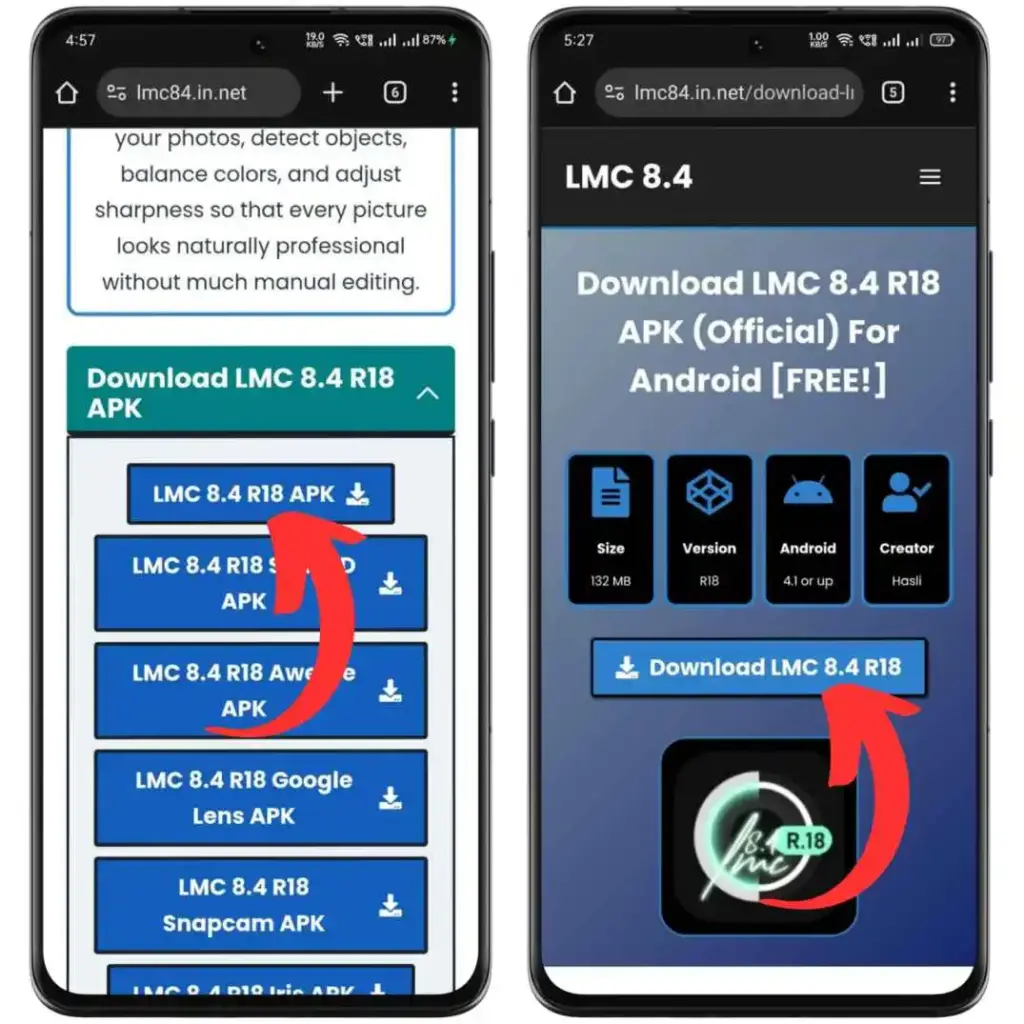
Tap to Download
Click the download button next to your chosen version and tap again on the next page to begin downloading.
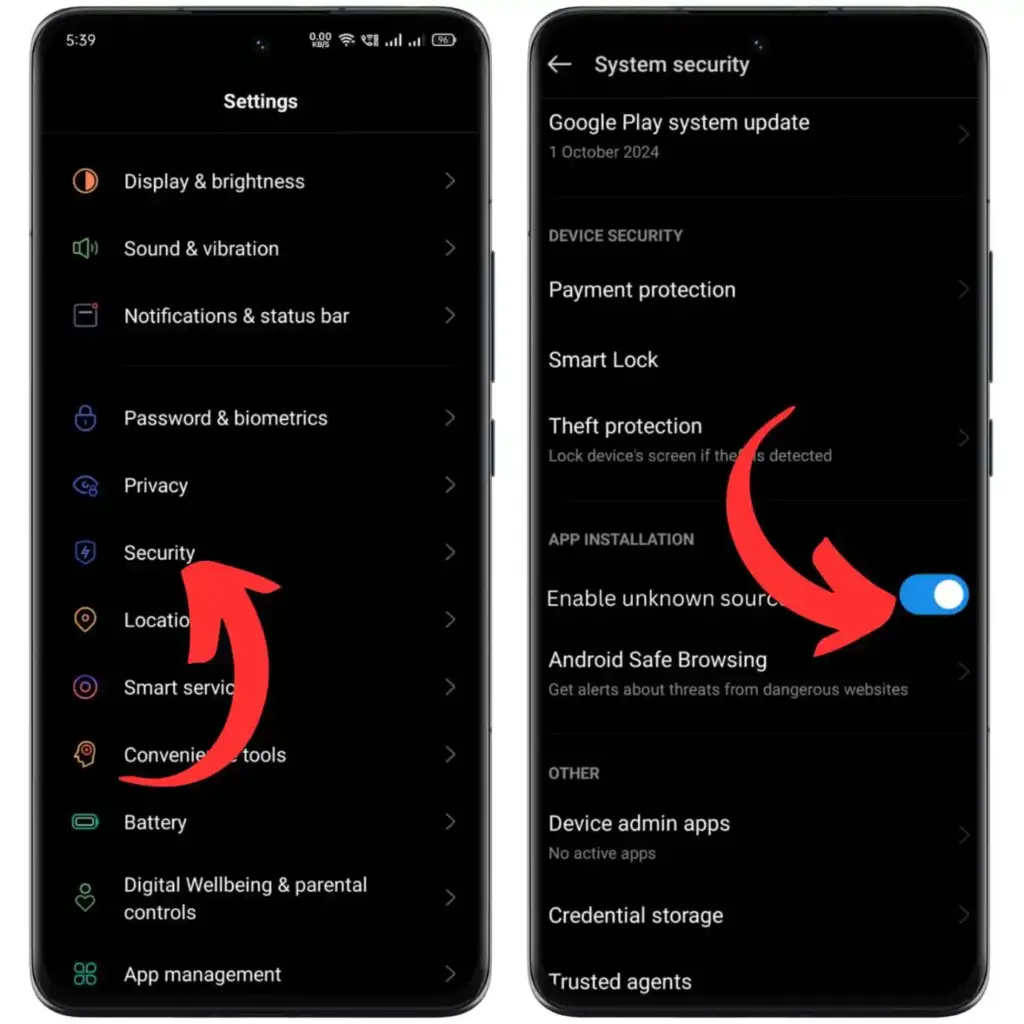
Allow Installation
Go to Settings → Security or Privacy and enable "Install from Unknown Sources" on your Android device.
Access File Location
Open your File Manager, navigate to the Downloads folder, and find the LMC 8.4 APK file you downloaded.
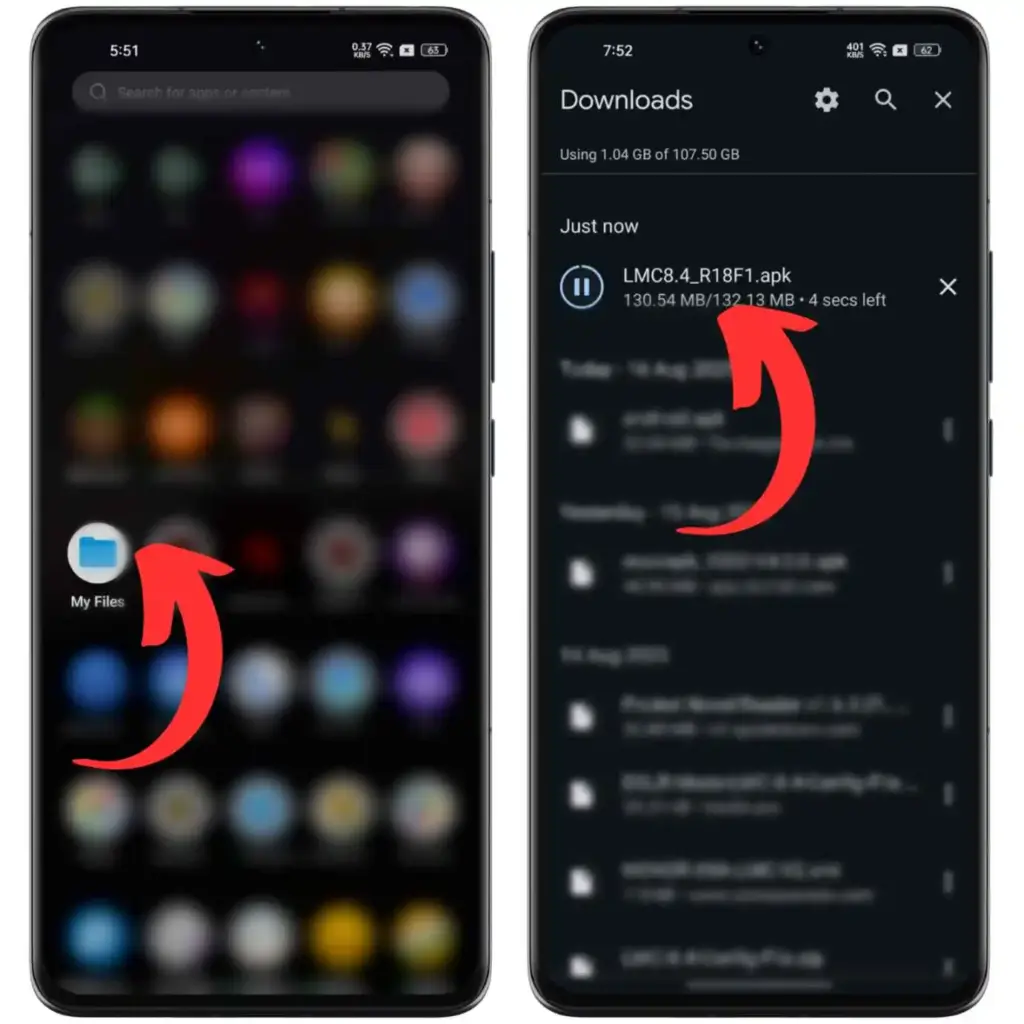
Begin Installation
Tap the APK file and press Install. The installation completes in just a few seconds.
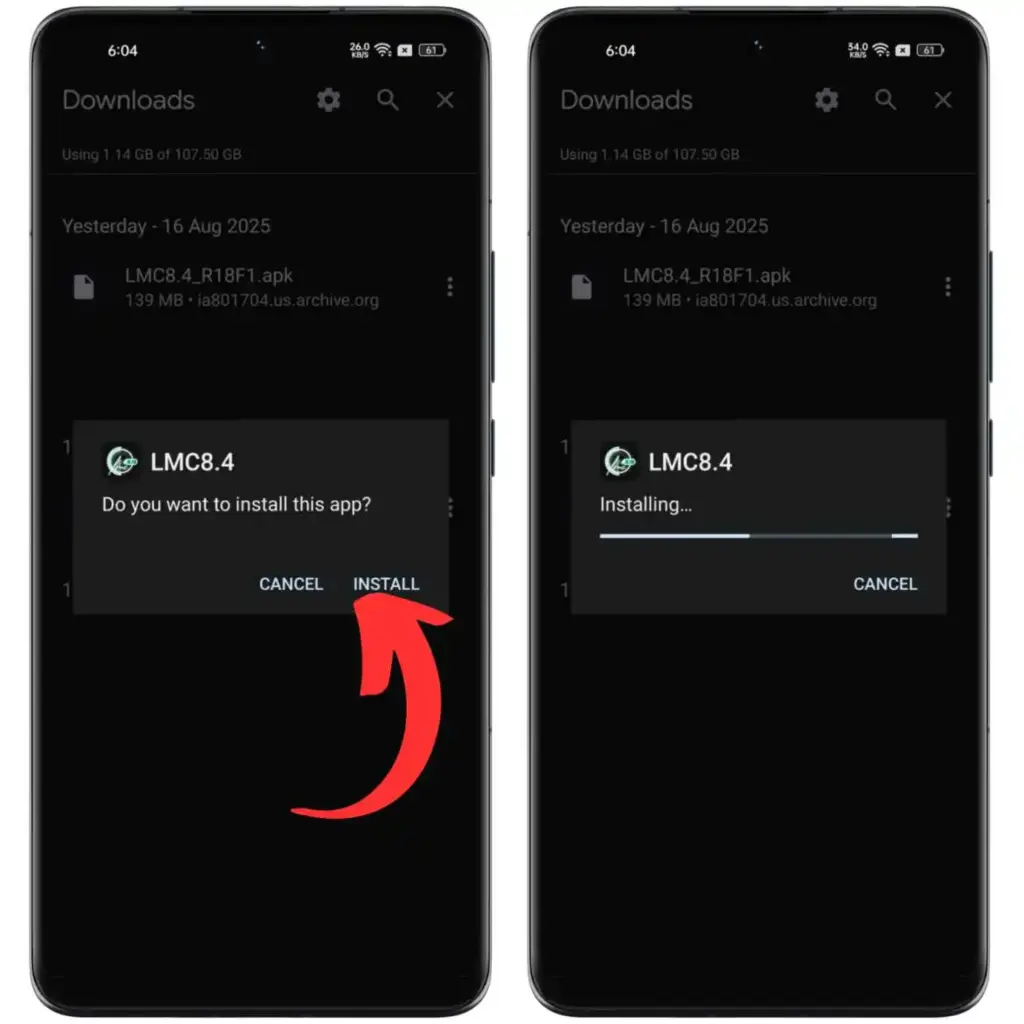
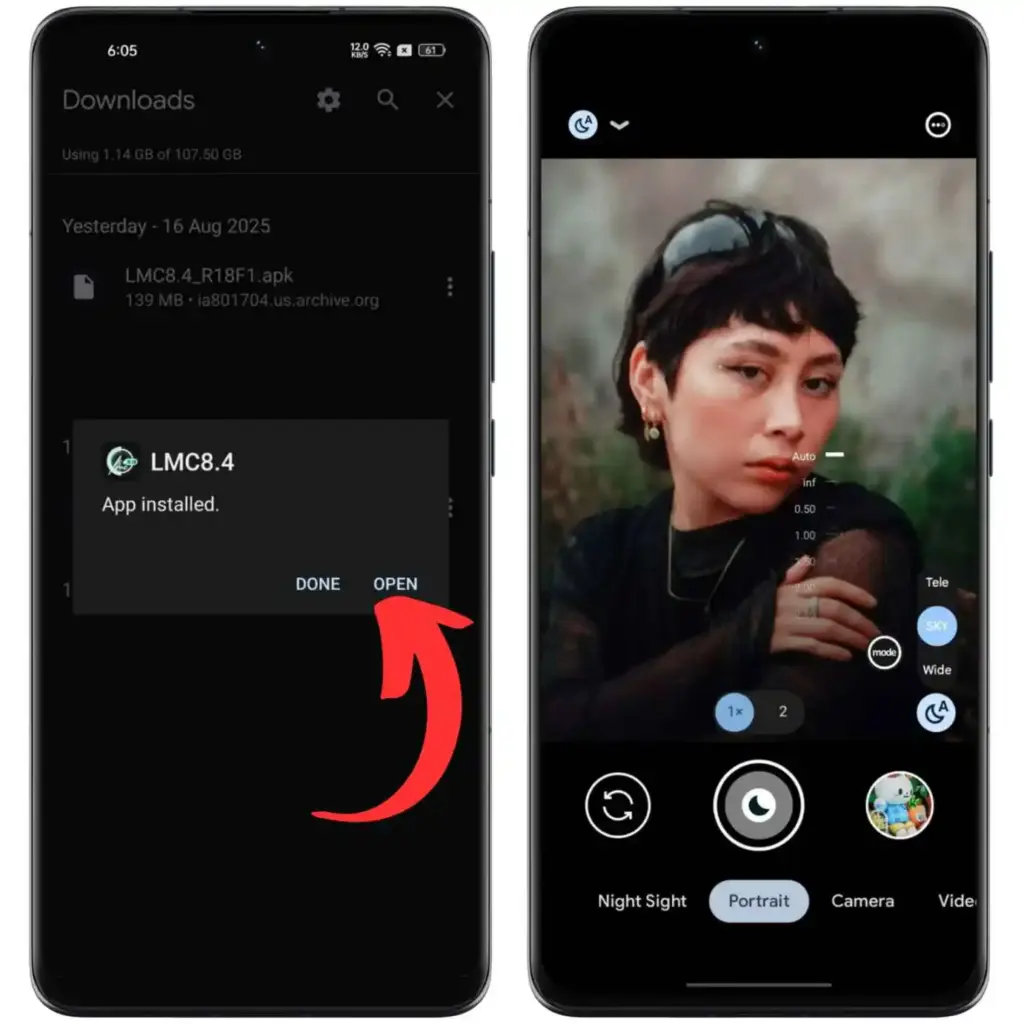
Launch and Enjoy
Open LMC 8.4 and start capturing stunning photos and videos with professional-grade camera features.
Ready to Transform Your Photos?
Download LMC 8.4 now and experience professional camera quality on any Android device. 100% free, no ads, no subscription.
Download LMC 8.4 APK — FreeLMC 8.4 XML Config Files
Unlock extra camera modes and fine-tune performance for your specific device model
How to Set Up Config Files
Extract the ZIP File
Download a config ZIP, open File Manager, go to Downloads, and use Extract to unzip the contents.
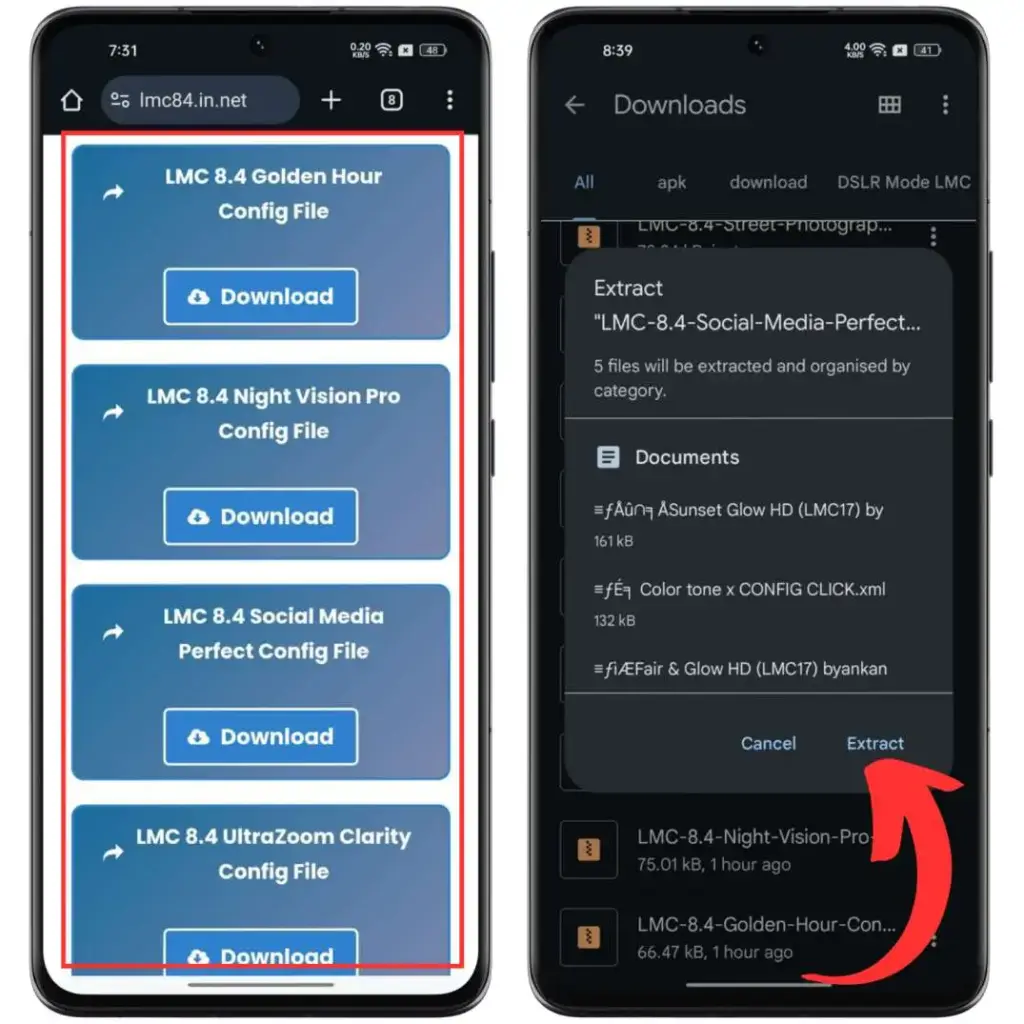
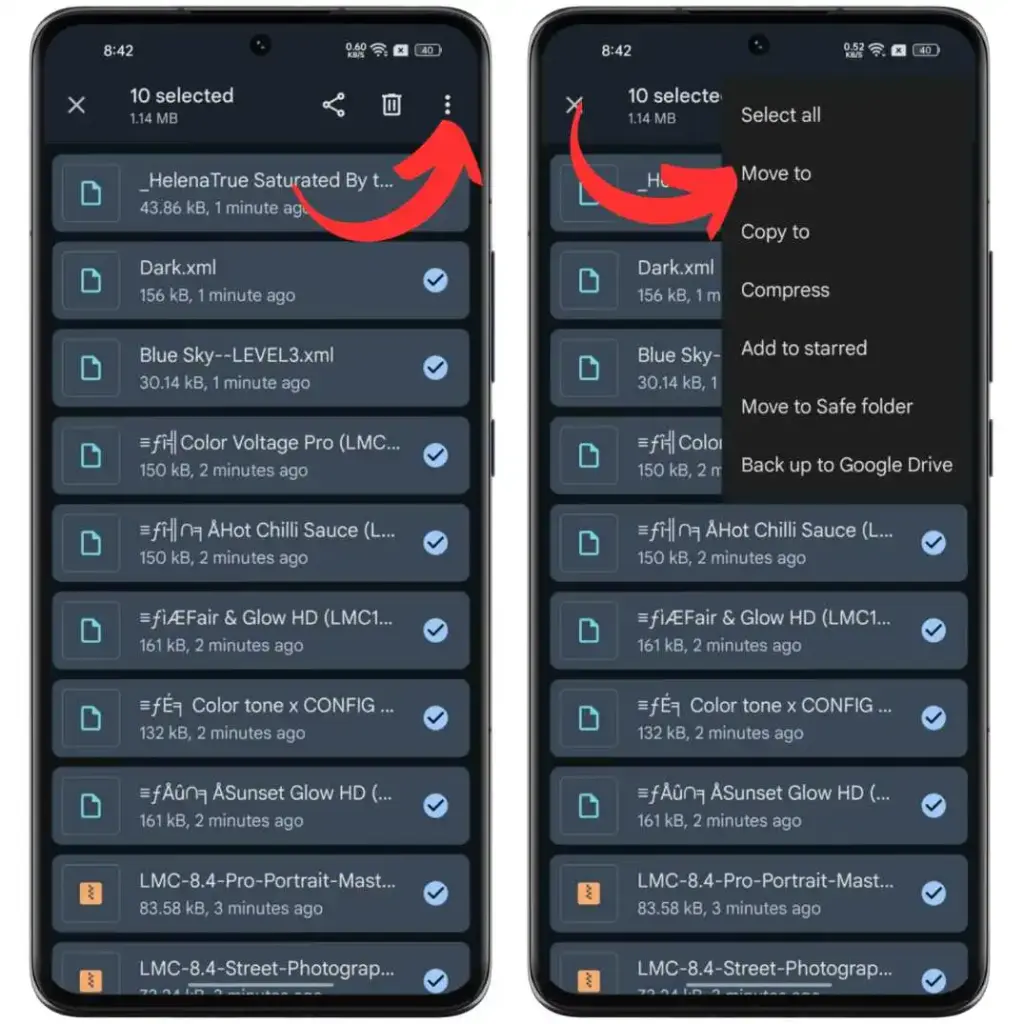
Move XML to LMC8.4 Folder
Select all XML files → Move To → Internal Storage → LMC8.4 folder (auto-created by the app on first launch).
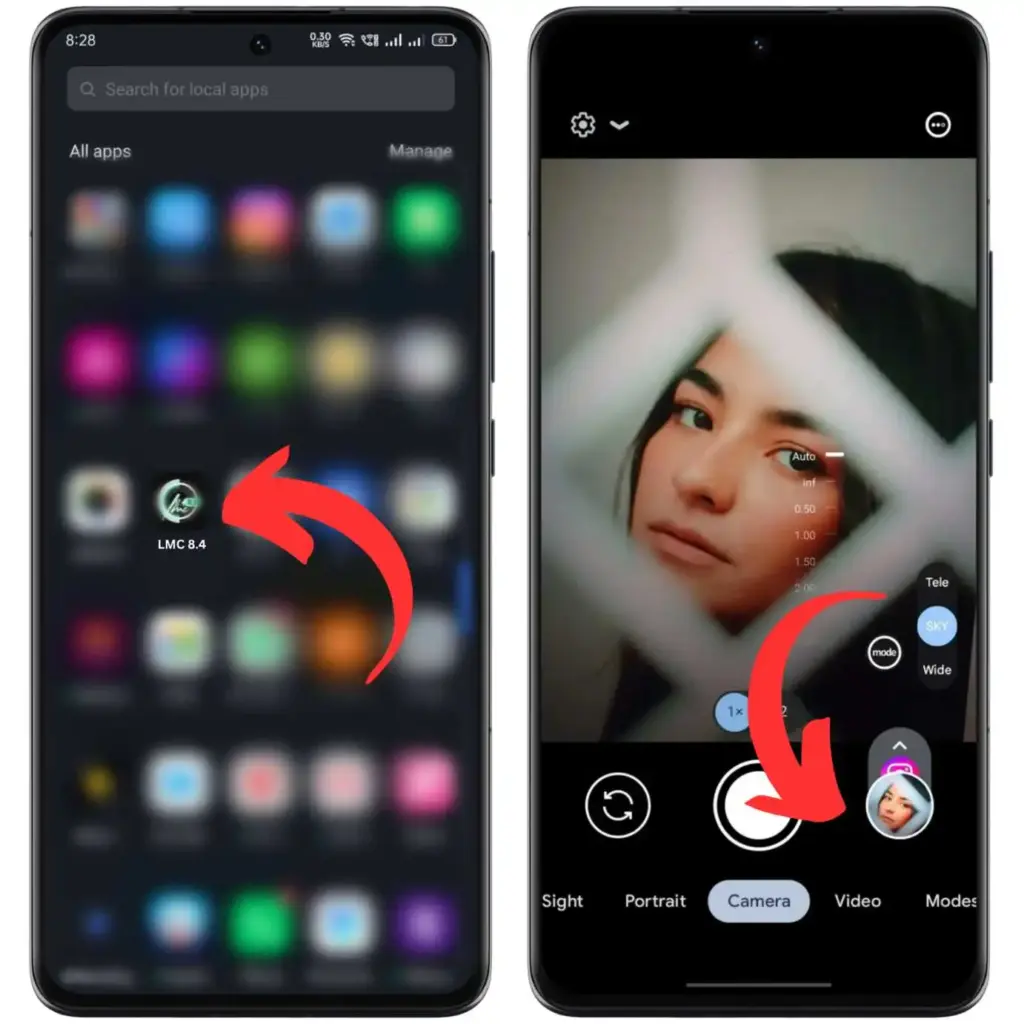
Double-Tap in the App
Open LMC 8.4. Double-tap the blank space between the shutter button and the preview icon on the main screen.
Import Your Config
A popup shows all available XML configs. Choose one and press Import. Your camera is now upgraded with new settings!
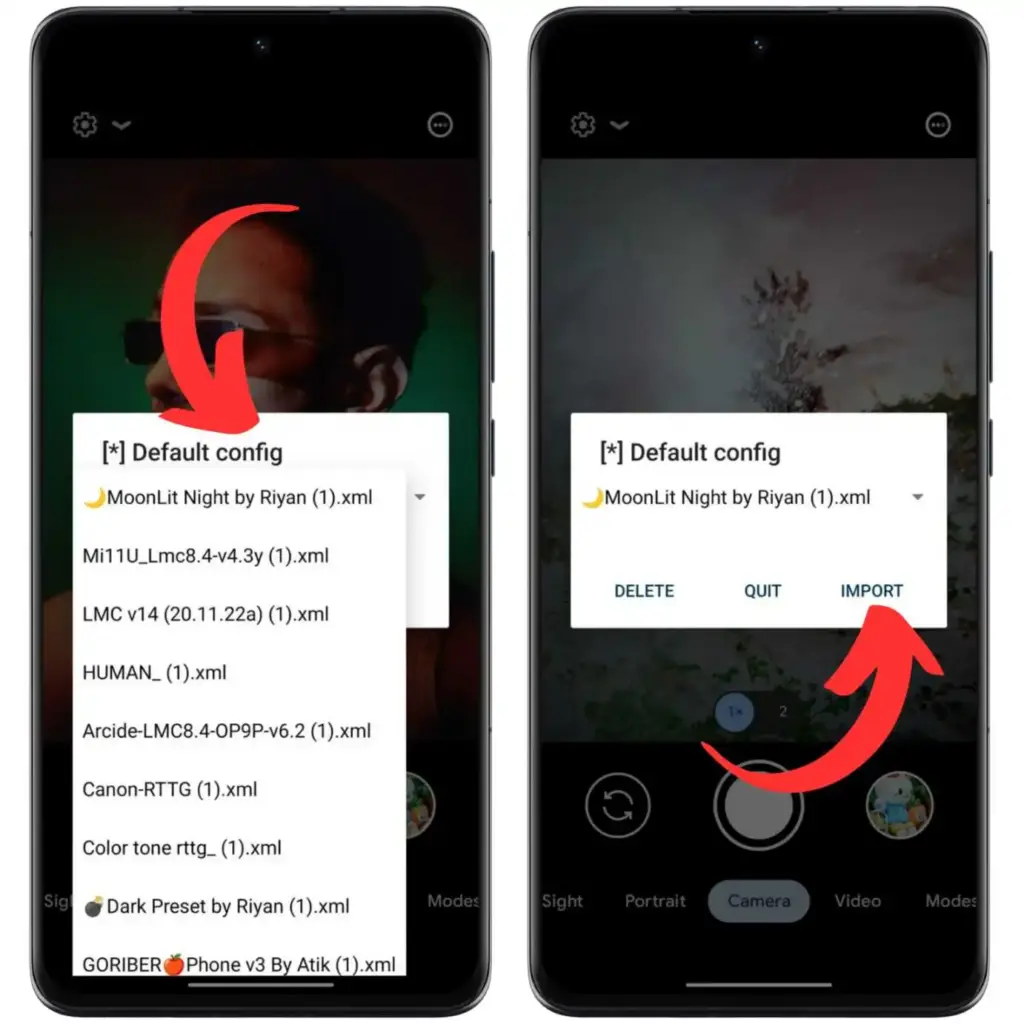
Available Config Files
An Honest Assessment
Know the advantages and limitations before you download
Benefits
- Better image and video quality compared to any stock camera app
- Completely free — no hidden costs, subscriptions, or in-app purchases
- Works on Samsung, Xiaomi, Realme, OnePlus, Vivo, iQOO, Nothing & more
- Professional-level manual controls: ISO, shutter speed, white balance
- XML config file support for device-specific hardware optimization
- Advanced modes unavailable on stock apps: Night Sight, RAW, Astro
- Frequent updates with bug fixes and new features by developer Hasli
Drawbacks
- Not on the Play Store — requires manual APK sideloading
- May crash on older or incompatible Android devices
- Uses more battery and processing power than stock camera apps
- Learning curve for beginners unfamiliar with manual camera controls
- Updates must be manually installed each time a new version releases
Frequently Asked Questions
Everything you need to know about LMC 8.4 before downloading
About Us
lmc84apkfile.com — Trusted GCam ResourceWelcome to lmc84apkfile.com — your dedicated, reliable, and independent source for everything related to LMC 8.4, one of the most popular and trusted Google Camera (GCam) mods available for Android devices worldwide.
What is LMC 8.4?
LMC 8.4 is a third-party camera application based on Google Camera, developed by the talented independent developer Hasli. It brings Google's advanced computational photography to millions of Android phones that don't officially support Google Camera. With over 10 million downloads, LMC 8.4 has become the go-to GCam mod for Android photography enthusiasts worldwide.
Why This Website?
We built lmc84apkfile.com to provide a safe, clean, and up-to-date source for LMC 8.4 APK downloads and config files. Finding the right version for your specific phone model can be confusing — so we've organized everything clearly in one place: all versions, all configs, full installation guides with real screenshots, and troubleshooting tips.
What We Provide
- Safe and verified LMC 8.4 APK files across all six versions (R13 through R18)
- Curated XML config files optimized for different shooting styles and device models
- Step-by-step installation and config setup guides with real screenshots
- Device compatibility information and version selection guidance
- Troubleshooting tips for common crashes and performance issues
- Regular updates whenever the developer Hasli releases a new version
About the Developer — Hasli
LMC 8.4 was created by Hasli, a respected and well-known developer within the GCam modding community. Hasli has built a strong reputation for releasing stable, feature-rich versions of Google Camera that work across a wide range of Android devices. The LMC series continues to be updated regularly to improve compatibility, stability, and features.
Supported Devices
LMC 8.4 is compatible with a wide range of Android smartphones including devices from Samsung, Xiaomi, Realme, Oppo, Vivo, OnePlus, Nothing, iQOO, Motorola, and many more. For the best experience, your device should run Android 4.1 or higher and support Camera2 API.
Important Note
lmc84apkfile.com is an independent informational website. We are not affiliated with, endorsed by, or officially connected to Google LLC, Google Camera, or the developer Hasli. All trademarks and brand names belong to their respective owners.
Get in Touch
Have questions, suggestions, or need help? Visit our Contact page and our team will get back to you within 24 hours.
Privacy Policy
Last updated: April 19, 2026At lmc84apkfile.com ("we," "our," or "us"), we are committed to protecting your privacy. This Privacy Policy explains how we collect, use, and safeguard your information when you visit our website.
Information We Collect
We may collect the following types of information when you use our website:
- Usage Data: Pages visited, time spent, browser type, device type, and IP address — collected automatically through server logs and analytics tools.
- Contact Information: If you fill out our contact form, we collect your name, email address, and message content.
- Cookies: We use cookies and similar tracking technologies to enhance your browsing experience and analyze website traffic.
How We Use Your Information
- To provide and maintain our website and its features
- To respond to your inquiries and support requests
- To analyze and improve website performance and user experience
- To detect and prevent fraudulent or abusive activity
- To comply with applicable laws and regulations
Cookies
Cookies are small text files stored on your device. We use essential cookies for the website to function, analytical cookies to understand traffic patterns, and preference cookies to remember your settings. You can control cookies through your browser settings, though disabling some cookies may affect website functionality.
Third-Party Services
We may use third-party services such as Google Analytics to better understand how our website is used. These services collect information in accordance with their own privacy policies. We are not responsible for the data practices of third-party services.
Data Security
We implement reasonable technical and organizational measures to protect your information from unauthorized access, disclosure, alteration, or destruction. However, no internet transmission method is 100% secure.
Children's Privacy
Our website is not intended for children under the age of 13. We do not knowingly collect personal information from children. If you believe we have inadvertently collected such information, please contact us immediately.
Your Rights
Depending on your location, you may have rights to access, correct, or delete your personal data. To exercise these rights, please contact us.
Changes to This Policy
We may update this Privacy Policy from time to time. Changes are effective immediately upon posting. Continued use of our website constitutes acceptance of the updated policy.
Contact
Questions about this Privacy Policy? Contact us here.
Terms and Conditions
Last updated: April 19, 2026Please read these Terms and Conditions carefully before using lmc84apkfile.com. By accessing or using our website, you agree to be bound by these terms in full.
1. Acceptance of Terms
By accessing lmc84apkfile.com, you accept and agree to be bound by these Terms and Conditions and our Privacy Policy. If you do not agree with any part of these terms, you may not use our website.
2. Description of Service
lmc84apkfile.com provides information, installation guides, and download links related to the LMC 8.4 GCam application for Android devices. We are an independent informational resource and are not affiliated with Google LLC, the official Google Camera team, or the developer Hasli.
3. APK Downloads
LMC 8.4 is a third-party application. By downloading APK files from our website, you acknowledge that:
- You are downloading software from outside the official Google Play Store
- You take full responsibility for enabling "Unknown Sources" installation on your device
- We cannot guarantee compatibility with every Android device or software version
- Use of the application is entirely at your own risk
4. Intellectual Property
Content on lmc84apkfile.com (text, guides, layout) is our intellectual property. The LMC 8.4 application and its underlying Google Camera technology belong to their respective owners. We do not claim ownership of the APK files distributed on this website.
5. User Conduct
You agree not to use our website to engage in unlawful activities, attempt unauthorized access to any system, use automated tools to scrape content in bulk, or transmit harmful or offensive content through our contact form.
6. Limitation of Liability
lmc84apkfile.com shall not be liable for any direct, indirect, incidental, special, or consequential damages resulting from your use of our website or the APK files provided, including but not limited to device damage, data loss, or any other harm.
7. Changes to Terms
We reserve the right to modify these Terms at any time. Continued use of the website after changes are posted constitutes your acceptance of the modified terms.
8. Governing Law
These Terms shall be governed by applicable laws. Any disputes arising shall be subject to the jurisdiction of the relevant courts in the applicable territory.
9. Contact
For questions about these Terms, please contact us.
Disclaimer
Last updated: April 19, 2026The information provided on lmc84apkfile.com is for general informational purposes only. By using this website, you acknowledge and agree to the following disclaimers.
No Affiliation with Google or Hasli
lmc84apkfile.com is an independent informational website. We are not affiliated, associated, authorized, endorsed by, or in any way officially connected with Google LLC, Google Camera, or the developer Hasli. All product names, trademarks, and brands mentioned are the property of their respective owners.
Third-Party Application
LMC 8.4 is a third-party Google Camera port (GCam mod) created by an independent developer. It is not an official Google product. Users download and install the application entirely at their own discretion and risk.
Accuracy of Information
While we make every effort to keep information accurate and current, we make no representations or warranties of any kind about the completeness, accuracy, reliability, or suitability of the information provided on this website. Any reliance on such information is entirely at your own risk.
Device Compatibility
We do not guarantee that LMC 8.4 will work on every Android device. Performance, stability, and feature availability vary based on device hardware, Android version, Camera2 API support level, and processor type. We are not responsible for issues arising from installing the app on incompatible devices.
No Responsibility for Damages
lmc84apkfile.com shall not be liable for any loss or damage arising from:
- Downloading, installing, or using the LMC 8.4 APK or any config files
- Device malfunction, crashes, freezing, or data loss
- Any consequences of enabling "Unknown Sources" installation on your device
- Inaccurate, outdated, or incomplete information on this website
- Content on external websites linked from this website
External Links
Our website may contain links to external websites for informational convenience. We have no control over the content or availability of those sites and accept no responsibility for them or any loss you may suffer as a result of following those links.
Config Files
XML config files on this website are created by third-party developers and community contributors. We make no guarantees about their performance on any specific device. Use all config files at your own discretion.
Contact
Questions about this disclaimer? Contact us here.
Get in Touch
Have a question about installation, device compatibility, config files, or need troubleshooting help? Our team is here and will respond within 24 hours.
Email Us
contact@buytextlinks.comWebsite
lmc84apkfile.comResponse Time
Within 24 hoursSupport For
All Android devicesQuick Tip: Before messaging us, check the FAQ section on the homepage — most common questions about installation, crashes, and device compatibility are already answered there. It's the fastest way to get help!